Start with a better question.
Instead of asking whether a file is “real,” ask what evidence travels with the exact copy in front of you. Content Credentials can help you examine recorded provenance: which tool produced a declaration, what actions it says happened, and which source assets it references. This is useful when a studio hands work to a client, a journalist receives a photo, or a creator wants to understand why two exports look identical but carry different histories.
C2PA organizes declarations into signed manifests. Assertions describe parts of the workflow, and a binding connects the declared content to an asset. A file can carry several manifests, with an active manifest representing its current provenance entry point. These are structured statements to inspect, not hidden visual watermarks to recognize by eye. The C2PA technical specification explains the model and the checks used by conforming implementations.
Three observations deserve separate lines in any practical report: whether embedded credentials were found, whether the available validation checks reported a problem, and whether the signing identity is trusted under an explicit policy. C2PA Studio performs an offline inspection and leaves identity trust marked as not checked. The green result is deliberately called “Credentials found,” rather than a promise that an event happened or that an account owns the footage.
Preserve the file you received before experimenting. Renaming a copy for organization is different from editing its bytes; re-encoding a clip creates a new delivery object even when it seems visually unchanged. Give each copy a useful name and note which one went through the editor, messaging app or platform download. That small habit makes later comparisons much more informative than a screenshot of a badge without its corresponding file.
Your first inspection, step by step
The screenshots below show this application, using a clearly identified test sample. They are a tour of the interface, not evidence about your own file. Your results will depend on the original asset, its format and the declarations actually embedded in it.
Choose the original local file.
Use “Choose a file” or drag one MP4, MOV, JPEG or PNG into the work area. Free inspection handles one file at a time; an activated Batch toolkit accepts a queue of up to 50. Each file must be no larger than 512 MB. No media bytes are uploaded. The browser may download the application’s own WASM engine the first time you inspect a file.
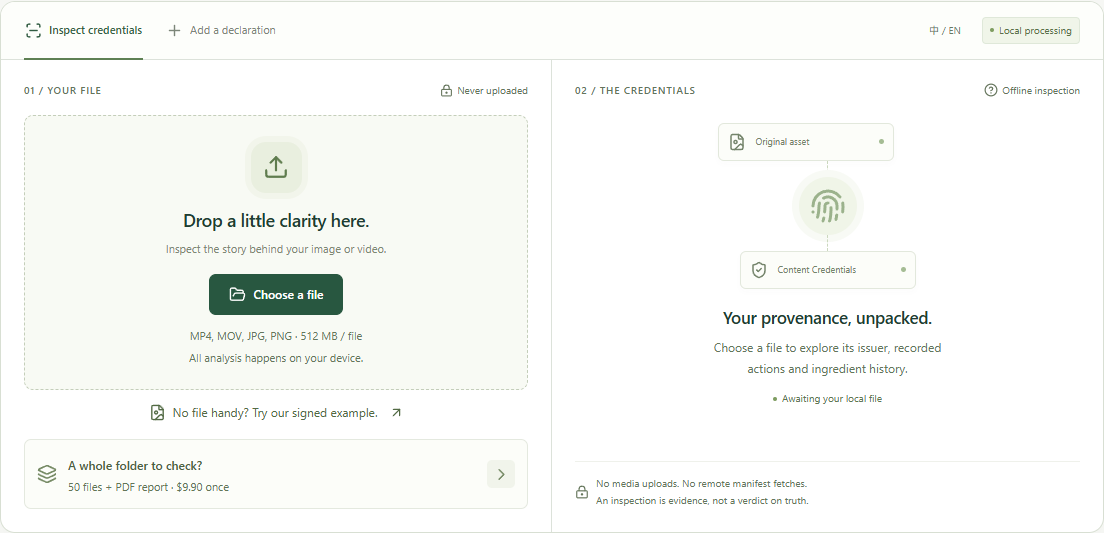
01 / The local file area, before inspection. Read the status before reading the story.
Wait for the current inspection to finish, then examine the headline and limitations. “No embedded credentials” differs from “Unable to inspect”: the first describes what the reader returned, while the second means it could not complete the check. For a batch, use the file selector to review every item; one success does not clear the rest of a delivery.
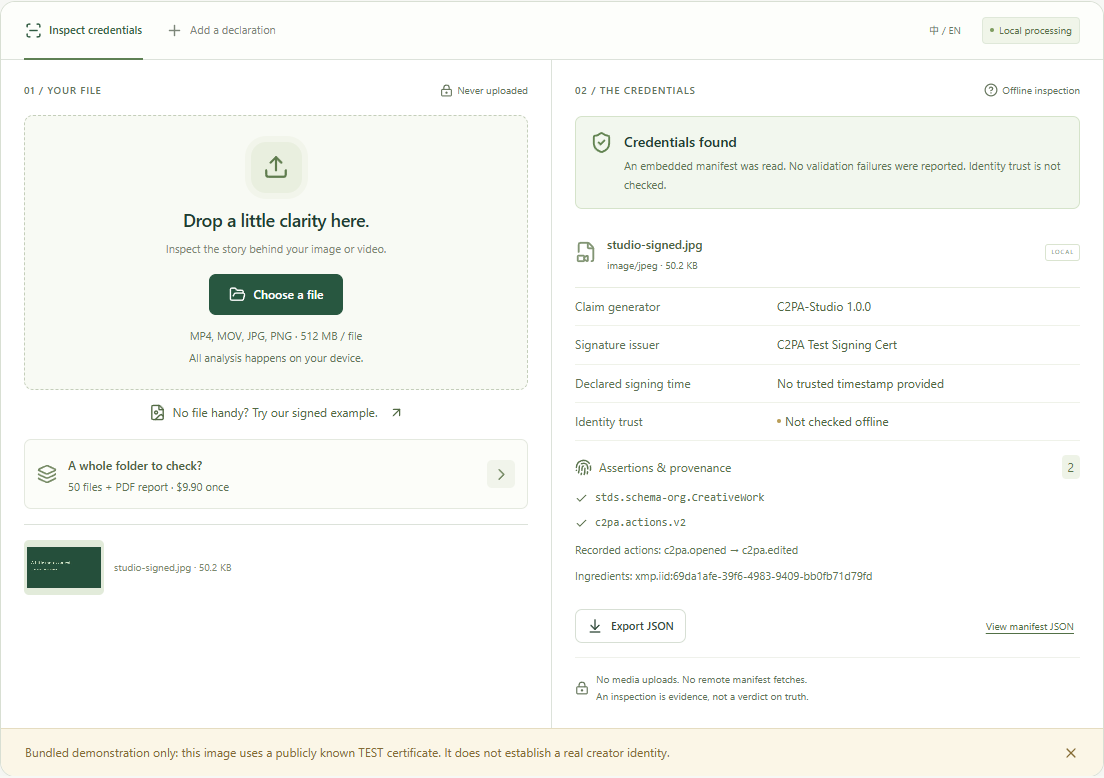
02 / A signed test sample with identity trust explicitly unchecked. Review details and save an inspection record.
Look at the claim generator, issuer, declared signing time, assertion labels and any ingredient references. Expand the JSON to inspect fields that the summary cannot fully explain. Save a JSON record for later comparison. Batch adds a local PDF summary. If a label is unfamiliar, preserve its exact spelling in the record instead of guessing what it proves.
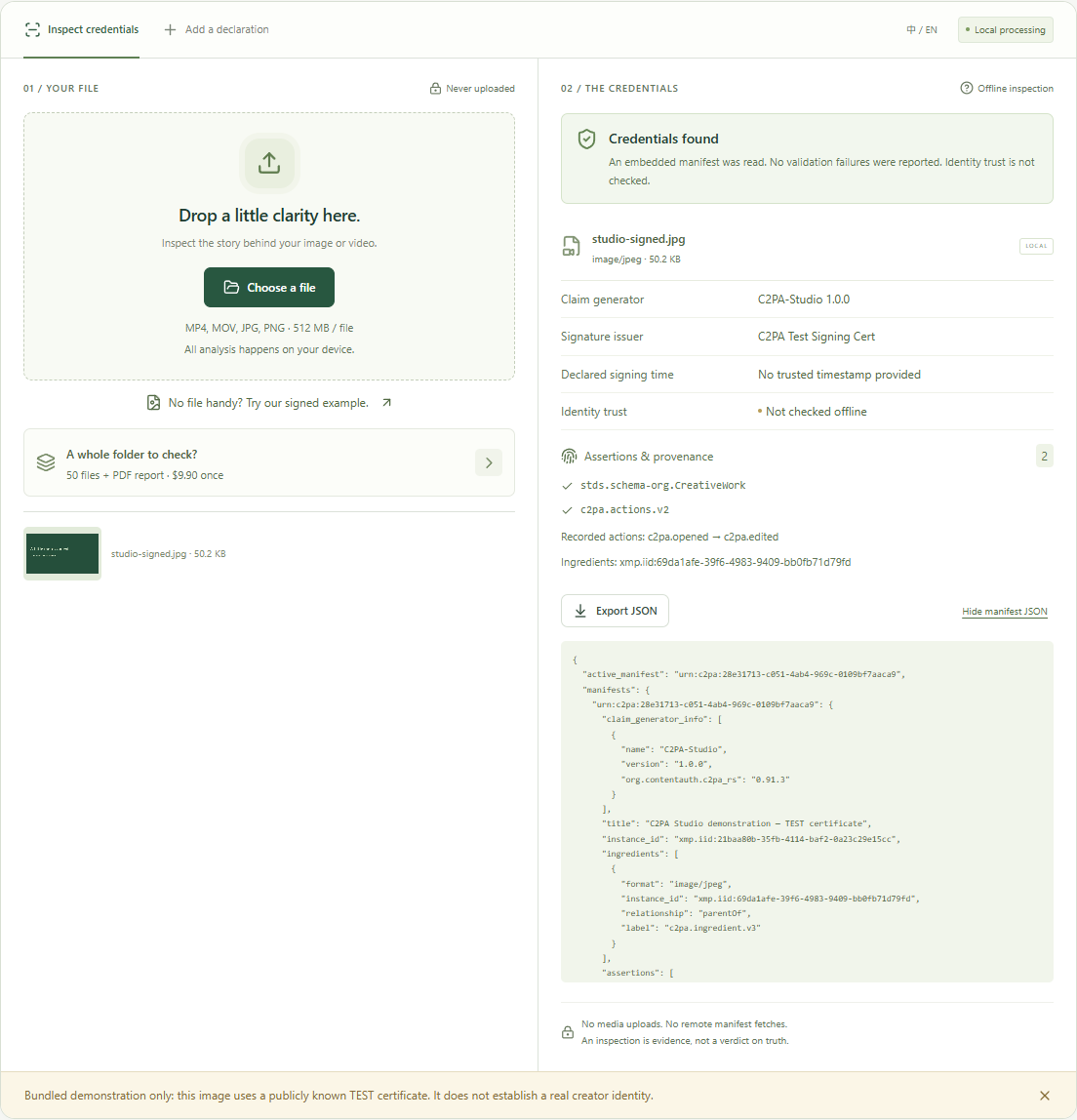
03 / Raw manifest data supports a more precise handoff.
For an export-preservation check, repeat the process on the source and the exported copy. Compare the active manifest, generator and ingredient references, rather than expecting byte-for-byte identical JSON. An editor that writes a new declaration may intentionally change the manifest. Document whether the new record still points to the expected source, and report missing history as a gap to investigate.
When the result needs a second look
A useful troubleshooting note names the input and the failed operation. “It says no” is hard to reproduce; “the original MOV reads, but this MP4 export returns a parsing error” gives an editor something concrete to test. Keep a copy of both files and the exact error text, but avoid publishing private client media in a support report.
| What you see | What it can mean | Next check |
|---|---|---|
| No embedded credentials | The reader returned no embedded manifest for this copy. | Inspect the original export. A remote-only record is outside this offline check. |
| Validation issues | A reported assertion, binding or signature check failed. | Preserve the exact error and compare the source; do not silently rewrite the file. |
| Unsupported format | This interface does not accept the extension or the SDK rejects it. | Use an original supported format. Renaming WebM to MP4 is not conversion. |
| Unable to inspect | Corruption, malformed media, insufficient memory or an engine failure. | Try a small known file, reload the engine, then retest the original. |
| Identity trust not checked | No configured trust-list or current revocation validation. | Use a separate trusted verifier if the identity decision matters. |
| Signing fails | Unsupported key, invalid certificate profile or mismatched chain. | Use an authorized ES256 certificate and corresponding PKCS#8 P-256 key. |
On a constrained phone, prefer smaller originals and close other memory-heavy tabs. The 512 MB limit is a guardrail, not a guarantee that every device can process a file of that size. Batch works sequentially to reduce concurrent memory use. Stop queue requests take effect after the current file; completed results remain available so you can export the work already done.
Questions worth asking
Does finding Content Credentials prove a video is true?+
No. A signed statement can document a workflow without establishing whether the scene or its interpretation is truthful. A camera can record a staged event or a screen. Read the source, the recorded actions and the surrounding evidence together. Treat a successful cryptographic check as one observation about a file, never as an editorial verdict.
Does a missing manifest mean the file was generated by AI?+
No. Many real cameras and editing workflows do not write credentials. A download or conversion may also omit them. This inspector deliberately reports only the absence of an embedded manifest in the selected copy. It does not estimate AI probability, recover deleted history or identify a generation model from pixels.
Why is the signature issuer different from the creator?+
The issuer field describes the certificate issuer reported by the SDK. It is not necessarily the photographer, editor or copyright holder. The claim generator describes software, while a separate identity assertion may describe a person or organization. Keep those roles separate in a client report; do not turn a certificate organization into an unsupported authorship claim.
Can this inspect SynthID or invisible audio watermarks?+
No. SynthID is a different watermarking system. This tool reads embedded C2PA structures, rather than running a vendor watermark detector or listening for audio defects. A file can carry one mechanism, both, or neither. If your question concerns a particular watermark, use that provider’s documented verification route and record that result separately.
Why does the tool say identity trust is not checked?+
The privacy-first inspector runs without remote manifest retrieval, online revocation checks or a configured trust-anchor list. It can inspect embedded declarations and report validation issues within that scope. It cannot establish current certificate revocation status or a complete trusted identity chain. A second, appropriately configured verifier may therefore reach a different trust conclusion without either parser being broken.
Will a local signature satisfy Article 50 or force a platform label?+
A local signature records a declaration using the certificate you supply. It does not decide which legal duties apply, demonstrate compliance with every duty, or predict how TikTok or YouTube will process an upload. Keep human-facing disclosure, consent, licensing and machine-readable provenance as distinct checks. Ask qualified counsel about your actual role and publication context.
What can I safely share with a client after checking?+
Share the JSON inspection record and, with Batch, its PDF summary alongside a clearly identified delivery file. Review the report first: filenames, issuer details, dates and assertion contents can contain personal or project information. Explain the offline limitations and preserve the original. A report describes a check at a particular time; it cannot guarantee that a later downloaded or transcoded copy is identical.
Good provenance starts with a good workflow.
Our field notes cover platform disclosures, editing, signatures and handoff practices. Each article asks a different practical question and links to the relevant primary source.
Explore the field notesWritten for this tool · Reviewed 20 October 2026 · Technical foundation: official c2pa-web documentation. Legal and platform requirements can change; check the linked primary policies for your use case.